Binary Search Tree (BST)
Think about looking up a word in a paper dictionary. You don’t start on page one and flip through every page. You open to the middle, see whether your word comes before or after, and jump to the half that matters. Then you do it again, and again, until you land on the word. That’s a binary search tree!
The idea is simple.
A binary search tree, or BST, is a data structure that keeps values organized so you can search, insert, and delete quickly. It’s built from nodes (a numbered bubble in the diagram below), and each node follows one rule:
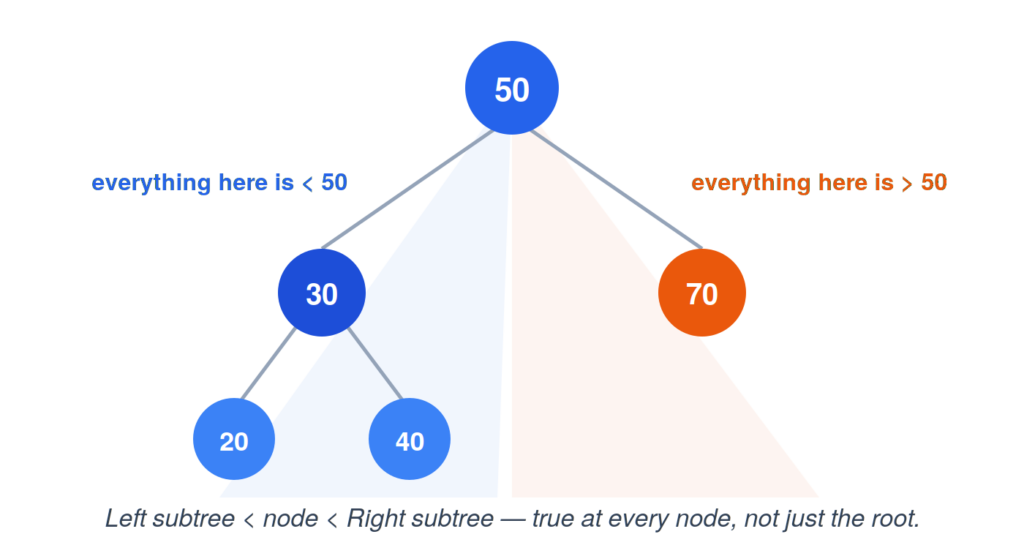
Everything in the left of a node is smaller than it. Everything in the right of a node is larger than it.
That rule applies at every single node, not just the top one. Look at 30 in the diagram — it’s smaller than 50, but it’s also the root of its own little tree, where 20 sits to its left and 40 sits to its right. So a BST isn’t just sorted top to bottom — it’s sorted at every branch, all the way down.
Here’s what one actually looks like:
The parts of a tree
Before going further, it helps to have names for the pieces:
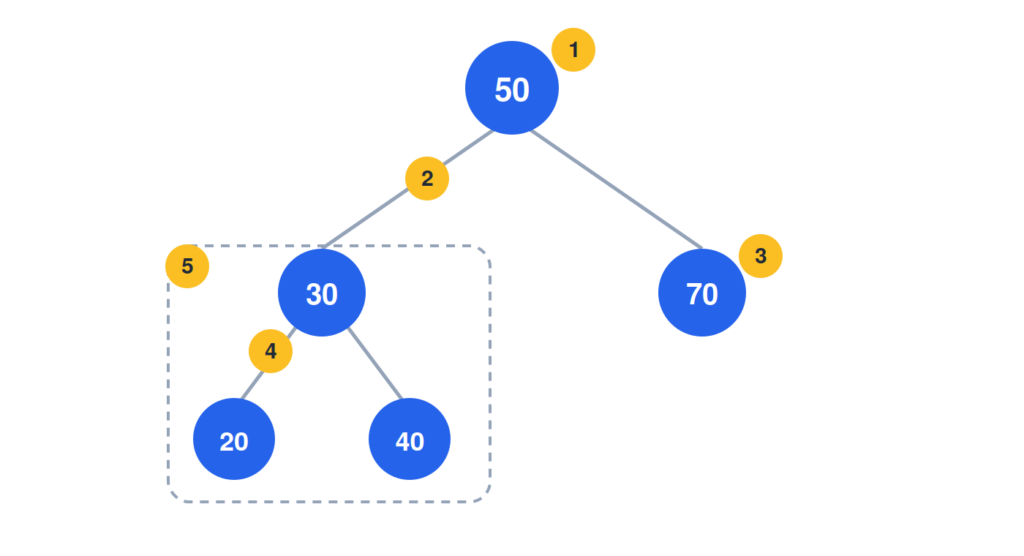
1. Root — the top node. Every search, insert, or delete starts here.
2. Edge — the connection between a parent and a child.
3. Leaf — a node with no children. In this tree, 20, 40, and 70 are all leaves.
4. Parent / child — 30 is the *parent* of 20 and 40; they’re its *children*.
5. Subtree — a node together with everything beneath it, treated as a tree in its own right. The nodes 30, 20, and 40 form the subtree rooted at 30.
BST Operations
A BST only needs a few operations to work:
| Insert | walk down from the root, going left or right depending on the value, until you find an empty spot. |
| Search | same walk as insert. Go left if you want something smaller, right if you want something larger, until you find it (or run out of tree). |
| Traverse | visit every node in order, smallest to largest. |
| Delete | find the node, then close the gap it leaves: remove it outright if it has no children, skip past it if it has one, or swap in its in-order successor if it has two. |
